
What is a DNS? Advanced Domain Name System Monitoring
Discover what a DNS system is, how it works, and why advanced DNS monitoring is critical for protecting your digital assets from downtime and hijacking.
Every time you type a website URL into your browser, you are relying on a complex, invisible architecture that keeps the internet functioning. At the heart of this global infrastructure is the DNS. But what is a DNS, and why is it so critical to the survival and security of your digital business?
Whether you are an SEO professional managing a portfolio of high-value domains, a systems administrator ensuring enterprise uptime, or an entrepreneur protecting your brand, understanding the DNS meaning is no longer optional. Furthermore, simply knowing how it works isn't enough; you must actively protect it.
In this comprehensive guide, we will explore the DNS definition, break down exactly how does DNS work, and introduce you to the critical necessity of advanced DNS monitoring using Domainyze.
What Does DNS Stand For? Unpacking the DNS Meaning
DNS stands for Domain Name System.
To provide a simple DNS definition, think of it as the phonebook of the internet. Humans access information online through readable domain names, like domainyze.com or google.com. However, web browsers and computers do not communicate using English words; they communicate using Internet Protocol (IP) addresses, which are complex strings of numbers (like 192.168.1.1 in IPv4 or 2400:cb00:2048:1::c629:d7a2 in IPv6).
The DNS system is the translation layer between human language and computer language. It translates the domain names you type into your browser into the IP addresses required to locate and load the requested web pages.
How Does DNS Work? The Architecture of the Domain Name System
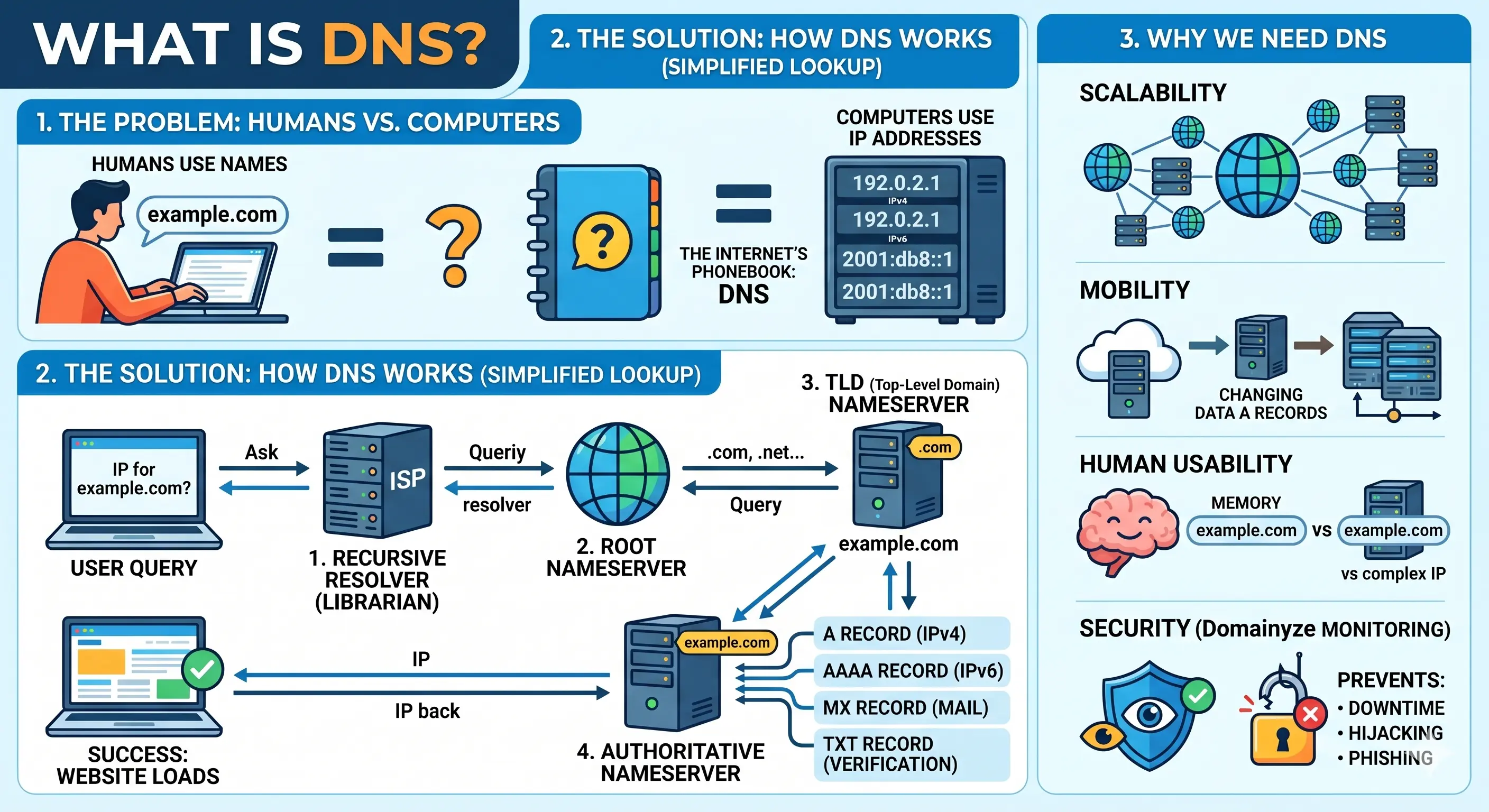
To fully grasp the domain name system structure, you need to understand the journey of a single DNS query. When you type a web address into your browser, a rapid, multi-step process occurs in the background, governed by the DNS protocol.
Here is what happens step-by-step:
- The Query: You type a domain name into your browser. Your computer first checks its local cache to see if it already knows the IP address. If it doesn't, it sends a query out to the internet.
- The DNS Resolver (Recursor): This query is typically received by a domain name system server called a DNS recursive resolver, usually operated by your Internet Service Provider (ISP). The resolver is like a librarian who is asked to go find a specific book in a massive library.
- The Root Server: If the resolver doesn't have the answer cached, it queries a DNS root nameserver. The root server doesn't know the exact IP address, but it knows where to direct the query based on the domain's extension (e.g., .com, .net, .org).
- The TLD Nameserver: The root server directs the resolver to a Top-Level Domain (TLD) nameserver. If you are looking for
domainyze.com, the TLD server for the.comextension will point the resolver toward the authoritative nameserver for that specific domain. - The Authoritative Nameserver: Finally, the resolver queries the authoritative nameserver. This is the final stop. This server holds the actual, specific DNS records for the domain (like the A record containing the IP address).
- The Connection: The authoritative server sends the IP address back to the resolver, which sends it to your web browser. Your browser then makes a direct HTTP connection to the server at that IP address, and the website loads.
This entire DNS protocol execution happens in milliseconds.
Why Do We Need a Domain Name System?
You might wonder, why do we need a domain name system at all? Why not just use IP addresses?
The primary purpose of the domain name system (DNS) is human usability. The human brain is not built to memorize strings of numbers for every website we want to visit. Imagine having to remember 142.250.190.46 just to check your email, and a completely different string of numbers to read the news.
The DNS system allows the internet to scale infinitely while remaining accessible. It also allows website owners to change their hosting providers (and thus, their underlying IP addresses) without having to change their public-facing domain name. You simply update your domain name server records, and the world continues to find you at the exact same URL.
Why Basic DNS Management Isn't Enough
Because the DNS domain name system controls the routing of your entire digital presence—from where your website points to how your company emails are delivered—it is a prime target for errors and malicious attacks.
Unexpected DNS changes can be catastrophic. If a record is accidentally modified by a team member, or maliciously altered by a bad actor, the results are immediate:
- Website Downtime: Modifying A or AAAA records can cause your website to become completely unreachable, destroying your SEO rankings and revenue.
- Email Delivery Failures: Unexpected changes to MX records can completely disrupt your business's ability to send or receive emails.
- DNS Hijacking: If a hacker gains access to your registrar and alters your Nameservers (NS), they can redirect all of your legitimate traffic to a malicious phishing site, stealing your customers' data and permanently ruining your brand's reputation.
This is exactly why relying on manual checks is no longer viable. You need automated oversight.
What Is DNS Monitoring and How It Works with Domainyze
DNS Monitoring is the proactive, automated process of tracking your domain's DNS records for any unauthorized, unexpected, or accidental changes.
Domainyze offers a state-of-the-art DNS Monitoring feature specifically designed to protect your portfolio. Available for all domains added to your Domainyze "Portfolio," this feature acts as a 24/7 security guard for your digital routing.
How Domainyze's System Works:
- Initial DNS Snapshot: The moment you add a domain to your Domainyze Portfolio, our system performs a comprehensive DNS lookup. It captures a total snapshot of all your current DNS records.
- Regular Automated Checks: Our system periodically and automatically queries your domain's DNS records on a regular schedule. No manual triggers are required.
- Intelligent Change Detection: We compare every single new check against the previous snapshot. The system meticulously identifies what records were added, removed, or modified.
- Immediate Alerts: The instant a DNS change is detected, Domainyze dispatches an immediate notification directly to your email or via Webhook, detailing the exact modifications.
Supported DNS Record Types
Domainyze's monitoring is exhaustive. We track the following critical DNS record types:
- A & AAAA: IPv4 and IPv6 addresses (the core records dictating where your domain points).
- MX: Mail exchange servers (controls your email routing).
- NS: Nameservers (the ultimate DNS authority for your domain).
- TXT: Text records (general purpose, often used for verification).
- CNAME: Canonical name (used for domain aliases and subdomains).
- CAA: Certificate Authority Authorization (controls which authorities can issue SSL certificates for your site).
- SOA: Start of Authority (core zone information).
- SRV: Service records (identifies service locations).
- SPF, DKIM, & DMARC: Crucial email authentication records that maintain email deliverability and prevent spoofing.
Common DNS Monitoring Scenarios: When to Relax and When to Panic
DNS monitoring will alert you to a wide variety of situations. Understanding these common scenarios is key to knowing how to react when a Domainyze alert hits your inbox.
Scenario 1: Nameserver (NS) Migration
- What Happened: Your domain's authoritative nameservers changed.
- Is This Normal? Yes, but only if you intentionally switched DNS hosting providers or migrated to a new registrar.
- Action Required: If you initiated this, verify all DNS records transferred correctly. If this change was unauthorized, this is a severe security alert. An unauthorized NS change indicates potential DNS hijacking. You must immediately log into your registrar, change your passwords, and contact support.
Scenario 2: Email Provider Change (MX & TXT)
- What Happened: Your MX records and SPF (TXT) records were updated.
- Is This Normal? Yes, if your company recently migrated from one email platform (like Google Workspace) to another (like Microsoft 365).
- Action Required: Confirm that your email routing works correctly and verify that your SPF, DKIM, and DMARC records are properly aligned to prevent your emails from going to spam.
Scenario 3: Website IP Address Change (A/AAAA)
- What Happened: The core IP address your website points to has changed.
- Is This Normal? Yes, if you recently upgraded your server infrastructure, migrated to a new web host, or implemented a Content Delivery Network (CDN) like Cloudflare.
- Action Required: Verify your website loads correctly on the new IP and ensure your SSL certificate remains valid for the new server. If you did not authorize a server move, investigate immediately.
Scenario 4: DMARC Policy Implementation
- What Happened: A DMARC email authentication policy (TXT record) was added.
- Is This Normal? Yes. Implementing DMARC is a critical email security best practice to protect your domain against email spoofing.
- Action Required: Monitor your DMARC reports to ensure legitimate business emails aren't being accidentally quarantined by strict policies.
Understanding DNS Change Alerts and Your Audit Trail
When Domainyze detects a change, the alert you receive is highly detailed. It will include the affected domain name, the exact timestamp the change was detected, the specific record types affected, and clear labeling of what was added or removed.
How to Respond to a DNS Alert
- Review the Details: Carefully read what records changed directly within the alert.
- Verify Internally: Check with your IT team, hosting provider, or co-founders to see if the change was an authorized part of planned maintenance.
- Investigate Unauthorized Changes: If no one authorized the change, treat it as a potential security incident. Reset your DNS provider passwords, review access logs, and enable Two-Factor Authentication (2FA) immediately.
The Power of the DNS Check History
Domainyze doesn't just send alerts; it maintains a complete history of all DNS checks performed on your Portfolio domains.
This audit trail is invaluable. You can navigate to your Portfolio, select a domain, and scroll to the DNS Check History section. Here, you can view all past checks in reverse chronological order. Checks with detected changes are highlighted, allowing you to pinpoint exactly when a configuration was modified.
This historical data is essential for incident investigation (correlating a DNS change with a specific website outage), demonstrating compliance for security audits, and referencing old record values if you ever need to perform an emergency rollback.
How to Enable DNS Monitoring in Domainyze
Securing your digital architecture with Domainyze is designed to be effortless. DNS monitoring is automatically enabled for all domains added to your Portfolio.
Steps to Secure Your Domains:
- Add Domain to Portfolio: Navigate to your Domainyze Dashboard and click "Add Domain." Enter the domains you wish to secure and select "Portfolio" as your monitoring type. Click "Add Domain(s)."
- Initial Snapshot: Once added, Domainyze will automatically perform its initial DNS check to capture your baseline records.
- Set It and Forget It: Automatic monitoring begins instantly. Checks run on a regular schedule, and you will receive alerts whenever a change is detected.
To view your current records at any time, simply click on the domain in your Portfolio and scroll to the DNS Records card. You will see collapsible sections for A, MX, NS, TXT, and all other supported record types, complete with "NEW", "REMOVED", and "Changed" badges for easy visual auditing.
Take Control of Your Domain Name System
Answering the question of "what is a dns" is just the first step in controlling your domains . The Domain Name System is the fragile, critical link between your customers and your business.
Leaving your DNS records unmonitored is akin to leaving the front door of your headquarters unlocked. By integrating Domainyze's automated DNS Monitoring into your workflow, you guarantee that you are the first to know about any changes (authorized or malicious) ensuring absolute uptime, flawless email deliverability, and ironclad security for your digital empire. Ensure your DNS strategy is proactive, not reactive.
Start Monitoring With Domainyze
Start monitoring and catching domains today.
Join founders, agencies, and domain investors using Domainyze to track changes, risks, and acquisition opportunities before they slip away.
Create Free AccountNo card required